
Anyone managing hybrid infrastructures with Azure Local knows the thin line between classic on-premises management and the cloud model. In a traditional Hyper-V environment, network security is delegated to physical or virtual firewalls, VLANs, and switch policies: a control layer external to the VMs, hard to orchestrate centrally and almost impossible to govern with the same tools used in Azure.
With the introduction of native NSGs (Network Security Groups) on Azure Local, Microsoft brings the same public cloud security paradigm inside the private datacenter. This is not simply about applying firewall rules: it is an architectural shift that moves network traffic control directly onto the cluster management plane, integrated with Azure Arc and governable from the Azure portal — exactly as it works for VMs in public Azure.
What changes from a security standpoint
In an Azure Local cluster without SDN, traffic between VMs on the same logical network is essentially unrestricted. Lateral movement is trivial once an attacker gains access to a single VM: there is no native mechanism to isolate, for example, the SQL server from the web VM, or to block east-west traffic between different application segments.
With the SDN Network Controller and NSGs integrated into Azure Arc, every network interface and every subnet can carry granular inbound and outbound access rules. The main security benefits are:
- Micro-segmentation: traffic isolation between VMs even on the same logical network, without additional VLANs
- Default-deny: an empty NSG blocks all inbound traffic by default, shrinking the attack surface
- Centralized management: policies are defined in ARM and visible from Azure, integrable with Azure Policy and Microsoft Defender for Cloud
- Cloud/on-premises parity: the same security criteria used in public Azure apply to VMs on Azure Local, with identical granularity and traceability
- Complete audit trail: every rule change is recorded in the Azure activity log
This model concretely enables Zero Trust approaches on the on-premises infrastructure, where every VM must earn its network access rather than receive it by default.
Prerequisites
Before proceeding, verify that the environment meets the following requirements:
- Azure Local version 2506 or later with OS build
26100.xxxxor higher - SDN enabled with an active Network Controller on the cluster
- Custom Location configured for the Azure Local cluster
- Access to a cluster node with the Azure Stack HCI administrator role
- RBAC role: Azure Stack HCI Administrator on the subscription
- At least one static logical network already created in the cluster
If SDN is not enabled, any attempt to create an NSG will fail with the error `AddOrUpdateNetworkSecurityGroup not implemented for non-NC provider`. Enabling the Network Controller is the foundational prerequisite — there is no way around it.
Enabling SDN with the Network Controller
This is the critical phase. The Network Controller is the SDN component that manages the cluster’s virtual network infrastructure (virtual switches, logical networks, network interfaces) and implements the traffic filtering on which NSGs rely: without it, NSG creation is not supported. In the SDN model enabled by Azure Arc, the Network Controller no longer runs in dedicated VMs but is integrated natively on the host as a Failover Clustering service, highly available across all nodes.
Enabling SDN is irreversible: once activated it cannot be rolled back or disabled. It must be treated as a definitive architectural decision. Furthermore, if the cluster already has a Network Controller installed with the traditional on-premises tools, this procedure **must not be run**.
Existing logical networks and network interfaces are **hydrated automatically** into the Network Controller: the existing configuration is preserved. A **maintenance window** must be planned, however, because while the Virtual Filtering Platform policies are applied the workloads experience a brief network interruption.
Before enabling SDN, prepare the following elements:
- SDN prefix: defines the name and REST URL of the Network Controller
-NC.domain.local. It must follow precise rules, otherwise enablement fails: - maximum 8 characters
- alphanumeric characters only (lowercase, uppercase, digits)
- hyphens allowed, but not two consecutive and not as the final character
- Management IP range: the fifth IP of the range configured in the cluster is reserved for the Network Controller REST endpoint and must be free
- DNS: an A record must exist for
<SDNPrefix>-NCpointing to the fifth IP of the management range:- in a dynamic DNS environment integrated with Active Directory, the record is created automatically (if dynamic updates are disabled, enable them from DNS Manager → Forward Lookup Zones → Properties → Dynamic updates → Secure only)
- in a static DNS environment, the record must be created manually before proceeding, and must not resolve to an already existing record
How do you find the fifth IP? If you documented how your Azure Local infrastructure was configured, it is straightforward; otherwise, run this command from one of the nodes:
Get-ClusterResource |
    Where-Object ResourceType -eq "IP Address" |
    ForEach-Object {
        $_ | Get-ClusterParameter Address
    }
Import-Module MOC
Get-ArcHciConfig | Format-List *
The value above the last one is the one to use for your configuration.
A missing (or incorrect) `
Enabling SDN with PowerShell
Unlike many Azure Local operations, enabling SDN is not done from the Azure portal: an Action Plan is run through the Add-EceFeature cmdlet directly from a cluster node.
Add-EceFeature -Name NC -SDNPrefix The cmdlet requires explicit acknowledgement of the network interruption before proceeding. To automate execution (e.g. in a deployment script) the prompts can be skipped:
Add-EceFeature -Name NC -SDNPrefix  `
  -AcknowledgeMaintenanceWindow `
  -AcknowledgeDNSRecordCreation
The operation installs the Network Controller as a Failover Cluster service and can take up to 20 minutes.
On completion, Add-EceFeature returns the Action Plan outcome: a sequence of steps with Success status. Enablement has succeeded when the log reports confirmation of SDN activation and the Network Controller REST URL, as shown in the figure.
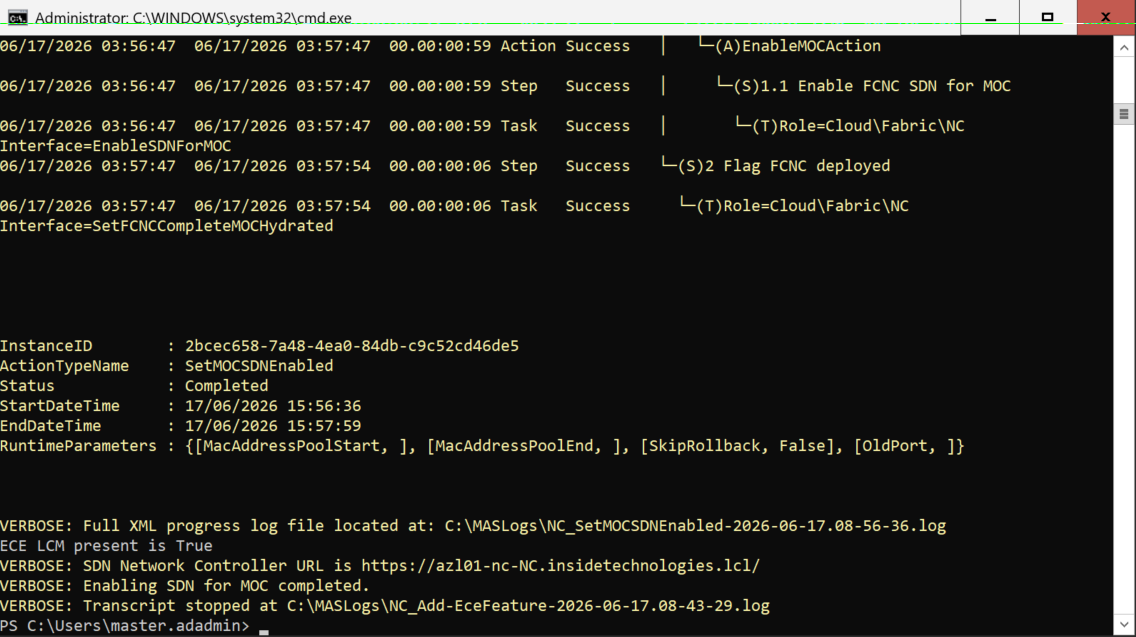
The complete operation logs are saved under C:\MASLogs\ on the node, useful for troubleshooting. Once the result is confirmed, the cluster is ready for NSG creation.
Creating a Network Security Group from the Azure portal
With SDN enabled, NSG creation happens entirely from the portal, with no need for CLI or PowerShell. From the Azure portal, navigate to the Azure Local cluster resource and select Resources → Network security groups.
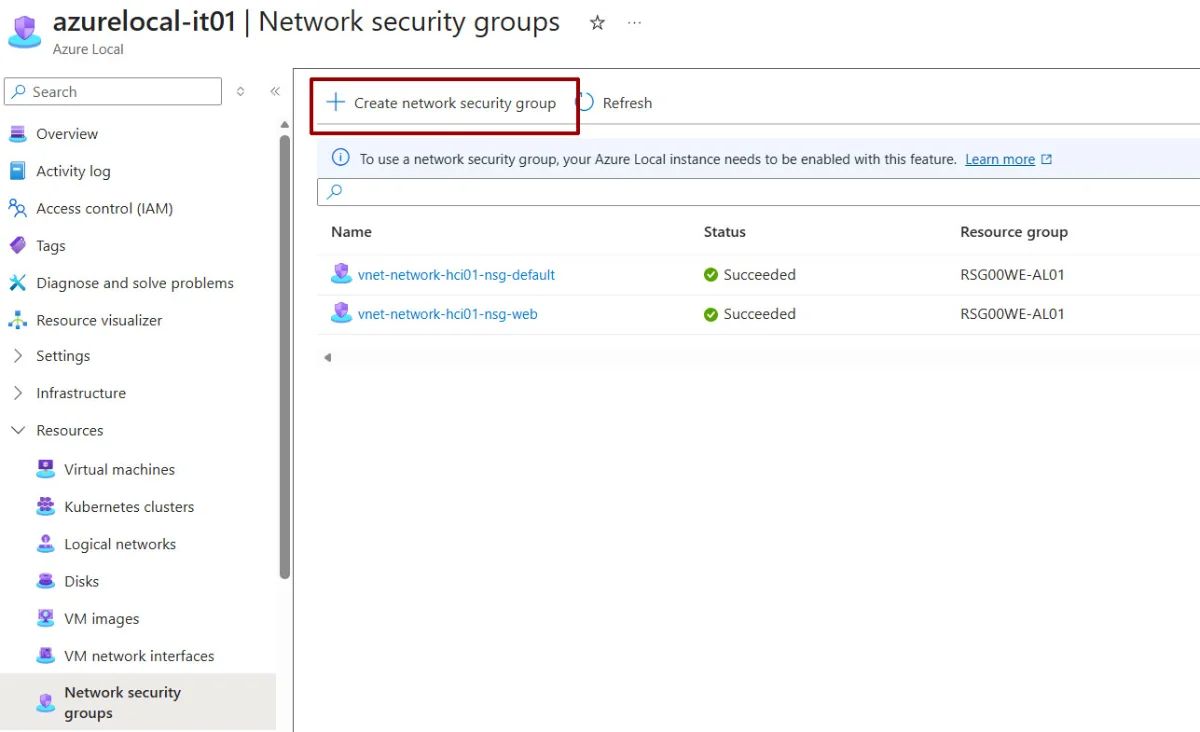
Fill in the basic details, choosing the NSG name carefully. Remember that, like all Azure resources, once an object name is set it cannot be changed; the naming convention is essential.
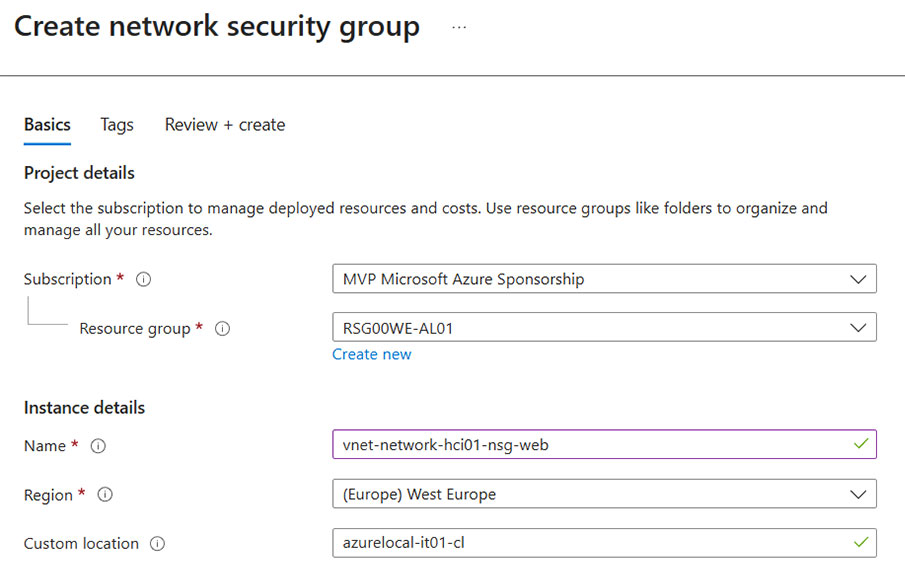
Creating the security rules
Rules are created from the same NSG panel, separately for inbound and outbound traffic.
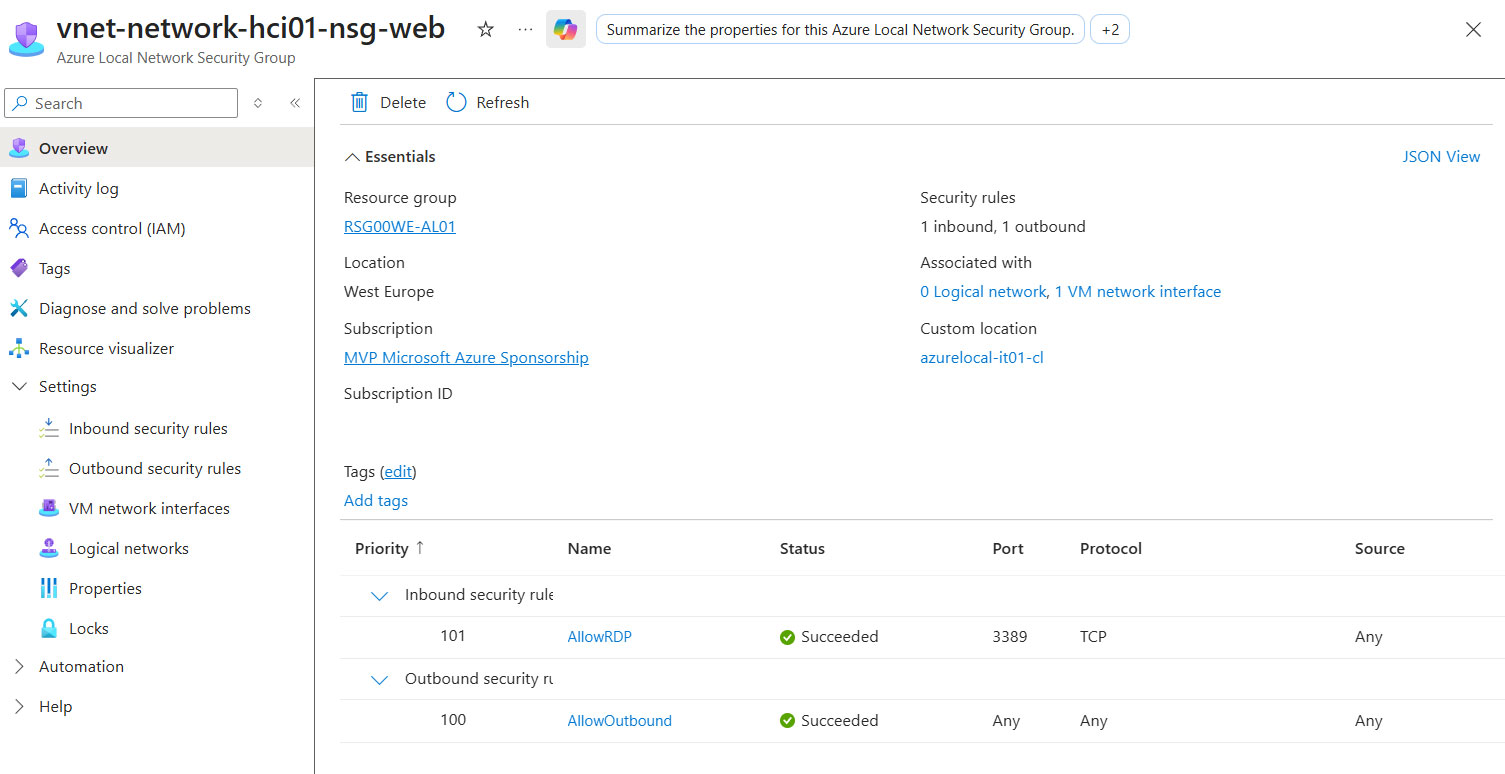
As with a classic Azure VM, it is important to set outbound traffic to Any, otherwise the server will not be able to communicate with the outside world. The next step is to create an inbound rule, but this only applies when inbound traffic must be allowed (permitting an RDP connection is one such case).
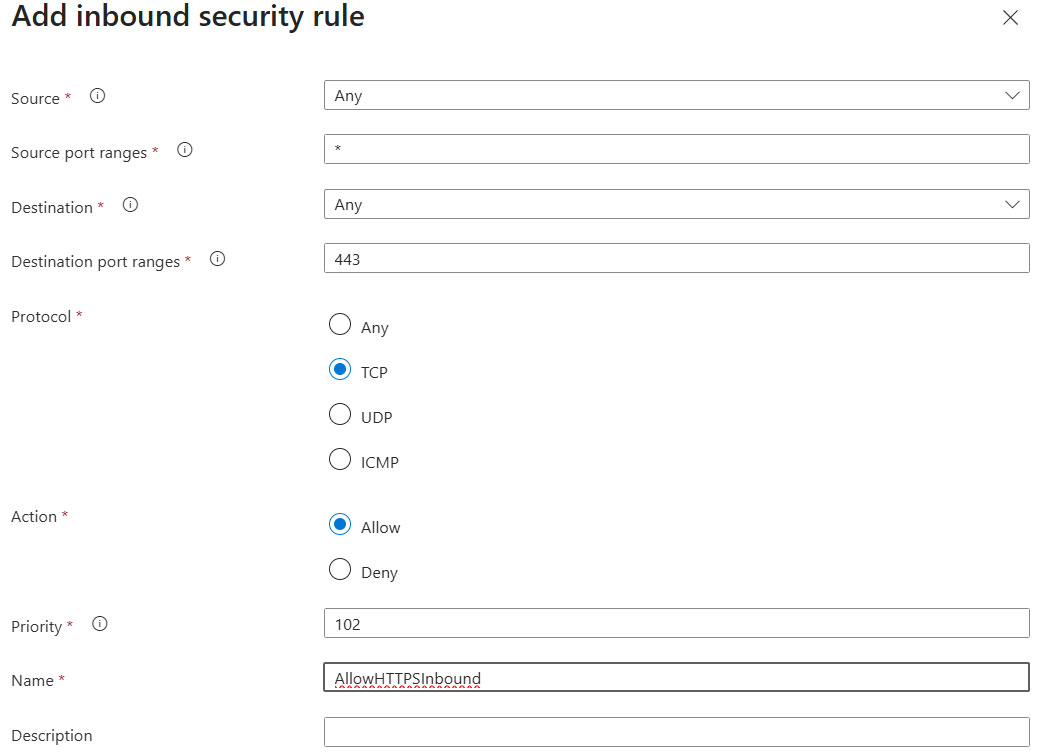
From the NSG page, select Settings → Inbound security rules → + Create. On the Add inbound security rule page, fill in the fields:
| Field | Description |
|---|---|
| Source | IP Address to specify a range, or Any for any source |
| Source IP address/CIDR ranges | E.g. 10.0.0.0/24 to limit access to the management subnet |
| Source port ranges | * for any source port (the most common) |
| Destination | IP Address or Any |
| Destination IP address/CIDR ranges | CIDR of the destination subnet, e.g. 192.168.1.0/24 |
| Destination port ranges | Port or range, e.g. 3389 for RDP, 443 for HTTPS |
| Protocol | Any, TCP, UDP, or ICMP |
| Action | Allow or Deny |
| Priority | Number from 100 to 4096 — lower value = higher precedence |
| Name | Unique rule name, e.g. allow-rdp-management |
| Description | Optional field, max 140 characters |
Applying the policy during VM creation
The NSG can be applied during the creation of a new virtual machine, but also at a later stage. To do it on existing VMs, open the target network interface.
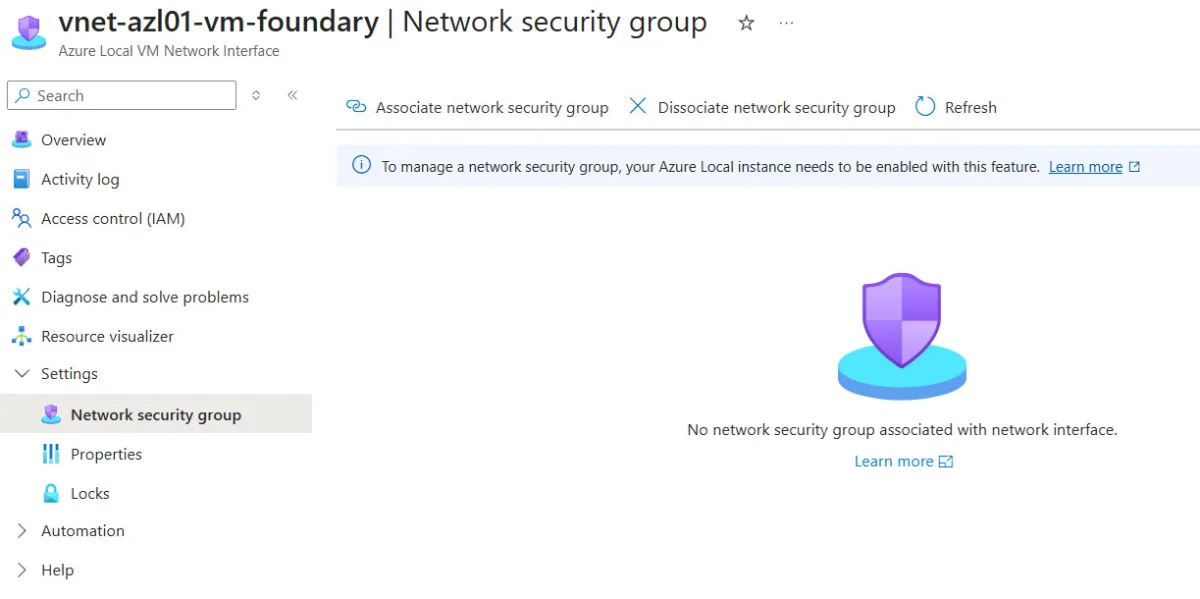
With the association button you can choose which NSG to apply to the VM; the same configuration can also be done at a higher level, namely the Logical Network.
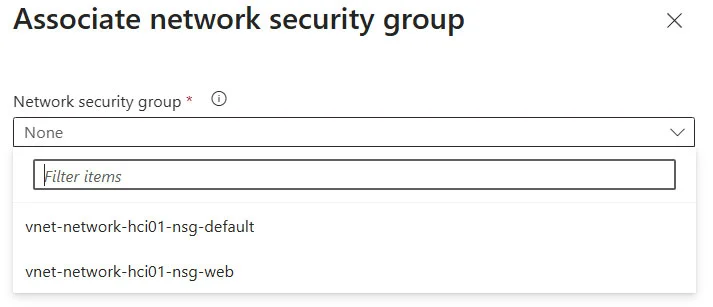
Mistakenly activating an NSG policy can block virtual machine traffic, so proceed carefully and test it in a safe environment first.
Conclusion
The introduction of native NSGs on Azure Local marks a qualitative leap in the security management of hybrid infrastructures. For years, the gap between network governance in public Azure and on-premises forced IT teams to maintain two separate operating models: one based on cloud policies, the other on traditional firewalls and VLAN segmentation.
With the SDN Network Controller and NSGs integrated into the Azure Arc control plane, this gap closes: the same security policies that govern VMs in public Azure can now be applied — with the same granularity and from the same interface — to VMs on Azure Local.
The foundational prerequisite remains enabling the Network Controller: a one-time, cluster-level step run via PowerShell with an Action Plan, after which NSG management becomes fully operational from the Azure portal. For production environments, it is recommended to adopt the default-deny model from the start (block all inbound, explicitly allow only the necessary flows) and to standardize the rules through ARM templates or Bicep, to guarantee consistency and traceability of the configurations across all clusters.
Get Started
DBS